- 2026/11/19
- 0 Comments
- 0 Likes
The best inventory management system for restaurants is the one that fits your size and fixes your biggest cost leak. If you run one independent location and want inventory, recipes and ordering in the same system as your POS, Foodnerd POS is the simplest start. If you run a group and need forecasting or deep cost analysis, Crunchtime, Apicbase, Craftable and Restaurant365 go further. MarketMan suits phone-based ordering, Orca suits recipe-driven kitchens, and MarginEdge suits bars and invoice-heavy back offices.
The problem is familiar. Food is one of your biggest costs, perishables spoil, and a spreadsheet count tells you what happened last week, not why your food cost moved. Software closes that gap by tying purchases, recipes, sales and counts together. Below you get eight options, each covered the same way: what it does, who it suits, and what it costs and limits. After that come a side-by-side table, a checklist for choosing, and guidance on when a spreadsheet is still enough.
We build Foodnerd POS, so we list it first and say plainly where dedicated back-office tools do more than we do. Competitor details come from published specs and user feedback, so confirm current pricing with each vendor before you commit.
Watch the video overview of these eight picks on YouTube.
1. Foodnerd POS
What it does
Foodnerd POS is a cloud-based restaurant POS that keeps inventory inside the same system as your orders. From the web portal you manage recipes, multi-location stock, expenses and supplier orders, while the POS handles dine-in, takeout, online and delivery orders from one menu.
- Dashboards of sales and performance, plus shift reports
- Sales exports for QuickBooks or Xero
- Order taking that continues offline in the native apps and syncs when the connection returns
- Apps for Windows, macOS, Android and iOS, so you can use devices you already own
Who it suits
Independent owners are the best fit: cafés, pizzerias, food trucks, bakeries and full-service rooms that want one subscription instead of a POS plus a separate stock tool. Setup is quick. You install the app on a phone or tablet, or open it in a browser, and start taking orders.
The trade-off is depth. Foodnerd does not advertise AI demand forecasting, barcode receiving or invoice scanning, so a kitchen that wants those should read the dedicated tools below. If you mainly need accurate recipes, supplier orders and sales data in one place, you may not miss them.
For a single independent location, one system that holds both sales and stock beats two systems you have to reconcile.
Pricing and limits
Plans are built for independent restaurants, and the trial is 14 days with no credit card needed. You can cancel anytime, and there are no hidden charges. Plan limits, such as orders per month and menu items, differ by tier, so compare them on the pricing page before you choose. Groups should ask the team how multi-location setup is priced.
2. MarketMan
What it does
MarketMan is a cloud platform built around purchasing. Its AI ordering predicts when to reorder from demand forecasts, and you can place orders from your phone without pulling up vendor order guides. Once a supplier is connected, price and product code updates arrive automatically and invoices land in one place.
- 28 POS integrations
- Growth plan adds automatic vendor management, AI recipe creation and waste tracking
- Bar code matching to existing inventory items
- Stock transfers from neighboring locations
Who it suits
MarketMan fits operators for whom ordering is the biggest time sink. If a manager spends evenings texting suppliers and keying invoices, consolidating that into one phone-friendly flow pays back quickly.
It is less forgiving of messy setup. User feedback mentions a tedious onboarding, occasional bugs and mixed support experiences. Plan a proper setup week and test your busiest supplier first.
MarketMan earns its place when your main pain is reordering, not deep cost analysis.
Pricing and limits
Pricing starts at $199 per month, and MarketMan is one of the few tools in this group that publishes a price. Forecasting is included with Enterprise and sold as an add-on on other plans, so check what your tier actually includes.
- Vendor integrations are somewhat limited
- Offline counting is limited
- The Growth plan allows only one core add-on
3. Apicbase
What it does
Apicbase combines recipe management, menu engineering, purchasing, receiving and performance dashboards. Its actual versus theoretical inventory view shows how well each site manages ingredients, and bar code scanning adds deliveries to stock instantly. It also generates purchase orders automatically and tracks semifinished products.
- 43 POS integrations
- Stock alerts when inventory runs low
- Reordering directly from vendors
- Forecasting on the Professional plan and above
Who it suits
Apicbase suits small chains that want every site in one system. The Growth plan covers up to 30 locations, and the Professional plan removes the cap.
Users praise the clear overview and support, but report a demanding initial setup and a subscription that can feel heavy for a single small restaurant. Pick it when you have several kitchens to compare, not one.
Apicbase pays off when you need to compare how different kitchens handle the same ingredients.
Pricing and limits
Pricing is custom quote only, so budget time for a sales conversation. Menu planning and inventory traceability are add-ons, which means the quote can grow.
- No built-in accounting integrations
- Pricing is not transparent
- Some users report slow loading and a crowded feature set
4. Crunchtime
What it does
Crunchtime is strongest at sales forecasting. Its AI engine predicts guest counts and checks, even adjusting for weather, and turns that into prep and order suggestions so you cook and buy closer to actual demand. It converts raw ingredients to finished goods automatically.
- 23 POS integrations
- Above-store reports by region or district
- Automatically generated order suggestions
- Payroll integrations
Who it suits
Crunchtime suits multi-unit operators who want forecast-driven prep. If waste comes from guessing how much to prep each morning, forecasting attacks the cause.
Forecasting needs history. Expect to upload old records or wait a few months before it performs well. Reviewers also note that customization is limited and that the mobile app on iOS has had update problems.
The forecast is only as good as the history behind it, so feed Crunchtime your old sales data on day one.
Pricing and limits
Pricing is a custom quote. Labor and kitchen management are separate products, so a full setup can cost more than the first quote suggests.
- Weekend customer support is limited
- Pricing is not transparent
- Slow processing is a recurring user complaint
5. Craftable
What it does
Craftable connects purchasing, receiving, inventory, accounts payable automation and financial reporting. It calculates plate costs from live vendor pricing, so a price jump on chicken shows up in your dish margins immediately. Its analytics help you spot underperforming dishes and simulate portion or pricing changes.
- 60+ POS integrations, around 1,000 vendors and 35 ERP tools
- Bar code scanning for audits and receiving
- Stock transfers
- Theoretical versus actual cost of goods sold tracking
Who it suits
Craftable suits operators who assemble their own stack and need a hub that connects to everything. Larger operations with higher sales tend to see the clearest return.
It rewards discipline. Users say accurate tracking takes significant daily time and that correcting mistakes can be awkward. A small restaurant without a dedicated back-of-house manager may find it heavy.
Craftable is the connector: choose it when your POS, vendors and accounting tools already exist and need to talk.
Pricing and limits
Pricing is a custom quote, and some reviewers describe the cost as high. Ask for the full figure including onboarding.
- You cannot set different minimum stock alerts for different times of year
- Live chat support is not available on weekends
- Pricing is not transparent
6. Restaurant365
What it does
Restaurant365 puts inventory beside built-in accounting, workforce management, payroll and HR. For inventory it offers real-time counts and COGS, recipe management, automated purchase orders, and daily prep lists that compare expected ingredient usage with what you have on hand. It tracks transfers and waste, and reports variance by location.
- 67 POS integrations
- Automatic syncing of invoices and recipes
- Real-time COGS reporting
- Inventory transfers and waste tracking
Who it suits
Restaurant365 suits groups that want one platform for the whole back office instead of stitching tools together. Finance and operations then work from the same numbers.
That breadth is also the risk. If you only need stock control, it is more than you need, and reviewers report setup complexity, app glitches and uneven support. Choose it for the accounting consolidation, not for inventory alone.
Buy Restaurant365 for the single back office, and treat inventory as one part of that decision.
Pricing and limits
Pricing is a custom quote. Plan for onboarding time as well as the subscription.
- Could be too much for a simple inventory need
- No weekend customer service
- Pricing is not transparent
7. Orca
What it does
Orca is a specialist for recipes and prep. It creates full color recipe cards with step-by-step instructions and a photo for each step, which helps when you train new cooks. Costs update from your daily invoice prices, and you can nest prep items inside other prep items inside recipes.
- 48 POS integrations
- Offline inventory counts
- Combining items bought from different vendors into one tracked product
- Unlimited support and training
Who it suits
Orca suits kitchens that cook from tight recipes and rotate suppliers based on price or availability. Treating three vendors' tomatoes as one product keeps your counts and costs clean.
Users give it high marks for ease of use and support. The gap is waste: Orca lacks dedicated waste management tools, so you would track spoilage another way.
Orca is a recipe-costing tool first, so pick it when plate cost is the number you chase.
Pricing and limits
Orca starts at $199 per store per month. A one-time licensing fee of $399 to $599 has also been reported, so ask for the first-year total.
- No dedicated waste management
- Integration limits on lower tiers
- Web-based only
8. MarginEdge
What it does
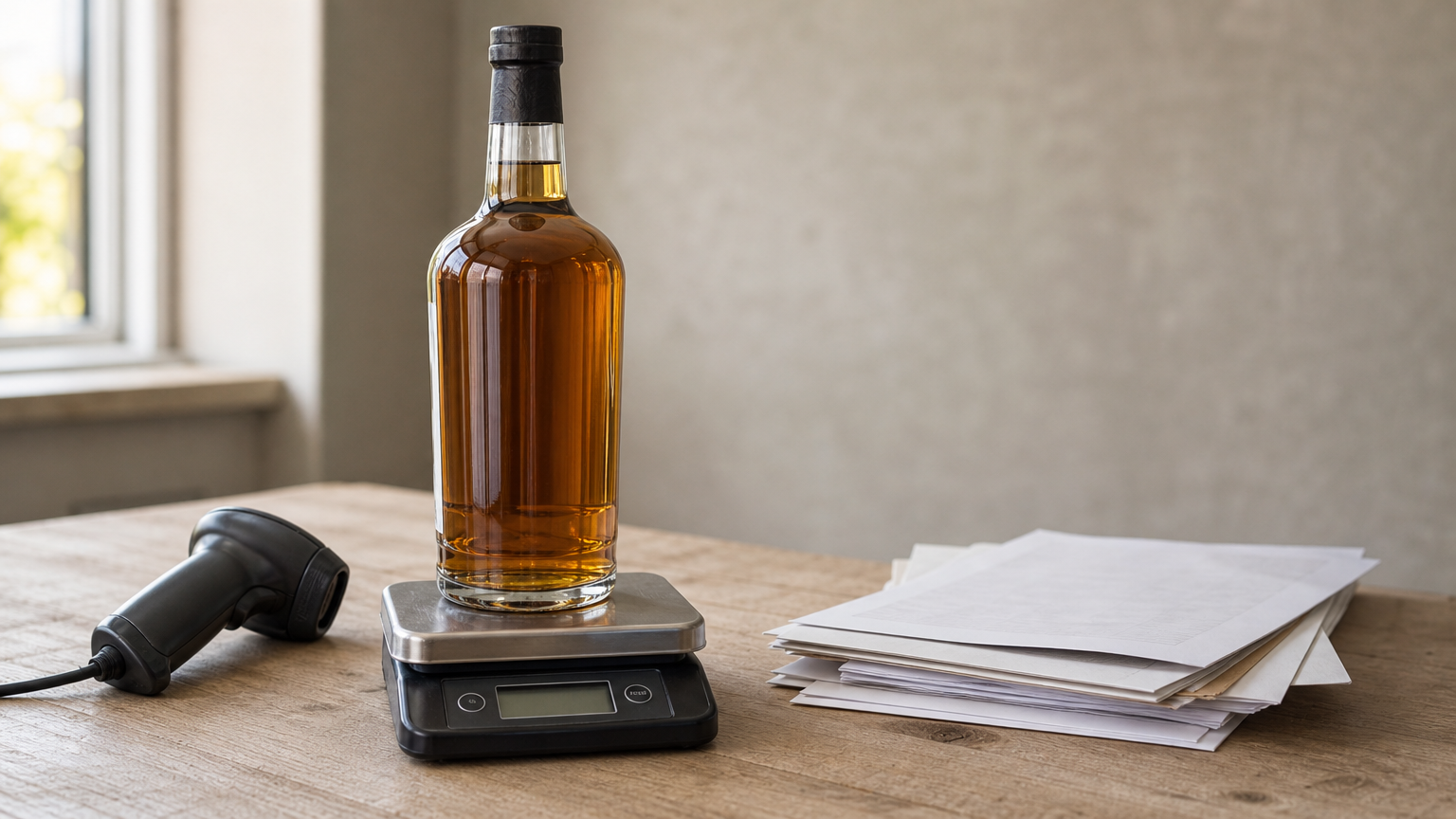
MarginEdge uses invoice data to show food and labor costs quickly. It handles invoice processing, unlimited bill pay and invoices at no extra charge, recipe management and menu analysis. Count sheets update as you order, and you can count products in multiple packaging units.
- 51 POS integrations
- Bidirectional product transfers across locations
- Freepour add-on for liquor counts: scan a bottle's bar code, then weigh it
- Food usage reports to help track waste
Who it suits
MarginEdge suits single locations and small groups with a bar program and a pile of supplier invoices. Cutting hand entry of invoices saves real hours, and bottle weighing makes liquor inventory far more precise.
Users find it robust and well supported, though some call it less intuitive and note limits on beverage tracking. Check the Freepour requirements before you count on bar features.
MarginEdge turns the invoice stack into cost data, which is where most small kitchens lose track of money.
Pricing and limits
Pricing starts at $330 per location per month, with a $250 setup fee per location. Freepour requires the $480 monthly plan.
- Expensive onboarding packages
- Setup fee per location
- Bar tools cost extra
How the eight picks compare
Side-by-side comparison
The table puts the published starting prices and the main trade-off of each pick in one view. Note that most dedicated tools sell by quote, so the real first-year cost takes a call to learn.
| Software | Starting price | Best for | Main watch-out |
|---|---|---|---|
| Foodnerd POS | See the pricing page | Independents wanting POS and stock together | No advertised AI forecasting or barcode receiving |
| MarketMan | From $199 per month | Mobile and AI reordering | Limited offline counting |
| Apicbase | Custom quote | Multi-location recipe control | Add-ons, no built-in accounting integrations |
| Crunchtime | Custom quote | Forecast-driven prep | Needs history, limited weekend support |
| Craftable | Custom quote | Connecting many tools | Cost and daily time |
| Restaurant365 | Custom quote | All-in-one back office | More than a simple need requires |
| Orca | $199 per store per month, plus one-time fee | Recipe costing, offline counts | No dedicated waste tools |
| MarginEdge | $330 per location per month, plus $250 setup | Bars and invoice automation | Freepour needs the $480 plan |
Which pick fits which situation
Match your biggest daily frustration to the tool built for it. Do not pay for forecasting if your real problem is late-night invoice entry.
- One location, one bill: Foodnerd POS
- Reordering from your phone: MarketMan
- Several kitchens to compare: Apicbase
- Prep set by forecasts: Crunchtime
- A stack of existing tools: Craftable
- Accounting and payroll in one place: Restaurant365
- Recipe training and plate costs: Orca
- A bar and many invoices: MarginEdge
Most dedicated tools hide their price behind a quote, so ask for a first-year total including setup before you compare.
What to look for in a restaurant inventory system
Features that cut waste and food cost
Any good restaurant inventory control software should do five things: track stock live or near live, create purchase orders, cost recipes from current prices, compare actual usage with expected usage, and log waste. If one is missing, you will fill the gap with a spreadsheet.
- Live or near-live stock levels tied to sales
- Purchase orders and low-stock alerts
- Recipe costing that updates with invoice prices
- Actual versus theoretical usage reports
- A waste log that staff can use in seconds
Here is why the usage report matters. Say you start a week with $12,000 of stock, buy $9,000 and end with $11,000. Usage is $10,000. On $32,000 of sales, your food cost is 31.3%. Many operators aim for roughly 28 to 35 percent, and a related rule of thumb, 30/30/30/10, splits revenue into about 30% food, 30% labor, 30% overhead and 10% profit. Use it as a starting point only.
Now the variance. Your recipes say you should have used 120 lb of chicken, but counts show 134 lb gone. The variance is 14 lb, or 11.7% over expected. That gap is portioning, waste, theft or a receiving error, and only software that compares both numbers will point you at it.
Integrations and setup effort
Check the POS integration before anything else. A restaurant stock management system that cannot read your sales cannot compare usage with expectation, so ask for a demo on your own POS. Then check accounting: exports to QuickBooks or Xero, or built-in accounting, decide whether your bookkeeper keys numbers twice.
Setup effort is the hidden cost. Entering every ingredient, pack size and recipe takes days in a full system. Staff buy-in matters more than features, so choose the tool your closing manager will actually use and start with your top 30 ingredients by spend.
Price versus return
Compare the price against the waste you can realistically remove. Imagine you buy $30,000 of food a month. If tracking trims waste by 1% of purchases, that is $300 a month, which covers a $199 plan and leaves $101. If it trims 3%, the plan returns $900.
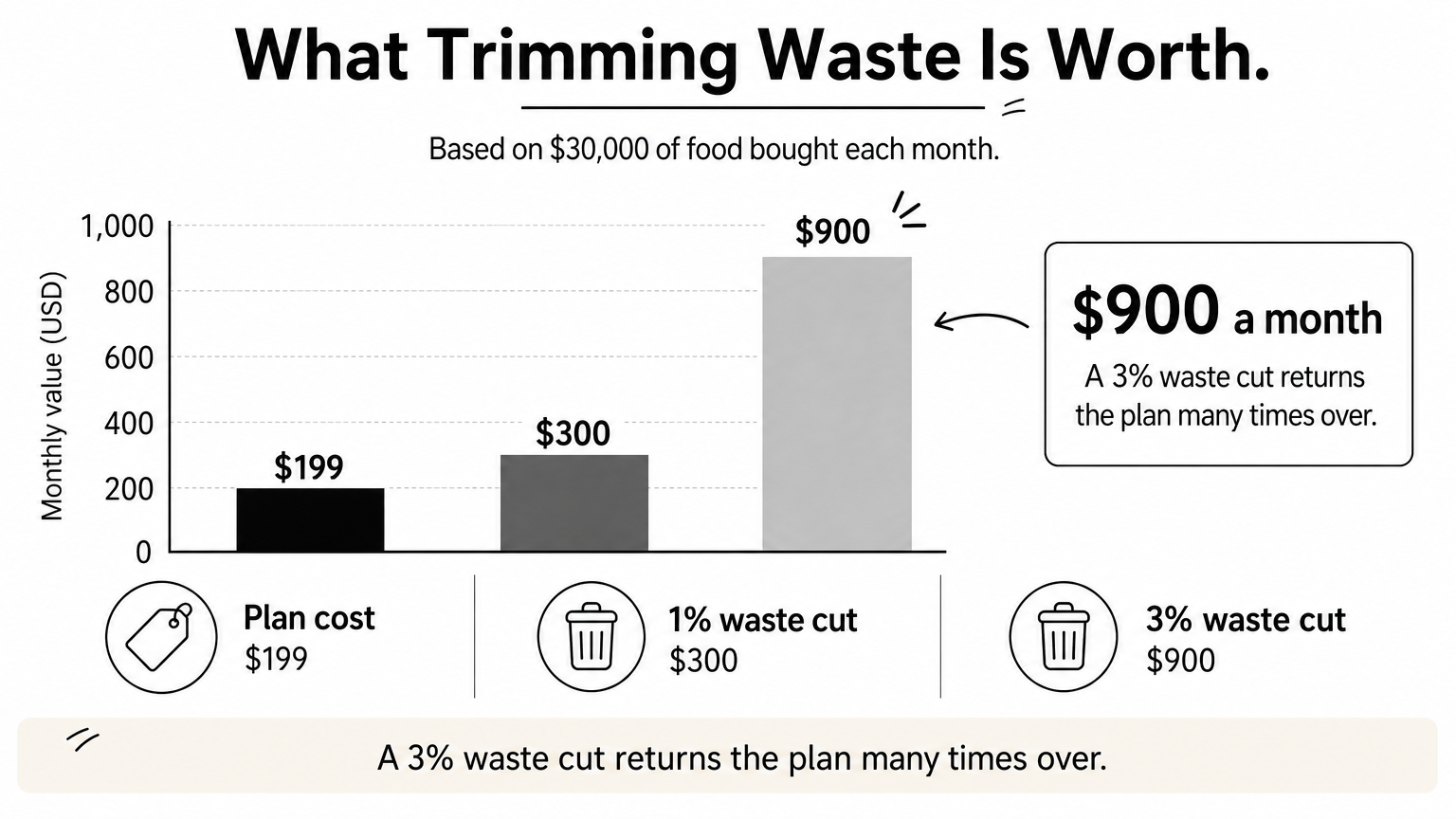
Price the whole package, not the headline number. Add setup fees, per-location charges, add-ons such as forecasting, and hardware like a receipt printer. A cheaper tool that your team uses beats an expensive one they avoid.
Judge any system by one test: will it surface the variance you cannot see today?
Spreadsheets, free tools and when to switch
Running inventory on a spreadsheet
A spreadsheet works for a single small kitchen if you count consistently. Count on the same day and time each week, ideally before opening or after closing, and count high-value or perishable items more often.
- Create columns for item, unit, current count, unit price and total cost.
- List every item, grouped by category such as meat, dairy, dry goods and liquor.
- Count in a logical unit, such as pounds or 12-bun packs.
- Record the latest price you paid.
- Add a par column, the minimum you want on hand, to trigger reorders.
Free tools and signs you have outgrown them
Free versions of general-purpose inventory apps can handle counts and low-stock alerts, but they rarely cost recipes or read your sales. They are a sensible first step for a food truck or café with a short menu.
Switch when any of these appear: you add a second location, delivery orders make demand hard to predict, your food cost drifts and you cannot explain why, or counting takes a manager more than a few hours a week. At that point restaurant inventory tracking software pays for itself in time alone.
A spreadsheet tells you what you have; software tells you why it differs from what you expected.
Choosing the system that fits your kitchen
Match the tool to your size and your biggest leak. A single independent location usually does best with inventory built into its POS, a group with several kitchens needs the comparison and forecasting of a dedicated platform, and a bar or invoice-heavy kitchen should look at tools built for those jobs. Whatever you pick, set up your top ingredients first and review variance weekly.
If you want inventory, recipes, supplier orders and sales in one system, test it on your own menu. You can start a 14-day trial without a credit card and compare Foodnerd POS plans and pricing against the dedicated tools above.

Join the conversation
Comments are reviewed before they appear.
